

Kubernetes vs Docker: Key Differences Explained
Blog post: Kubernetes vs Docker — Key Differences Explained
Introduction
Modern software development has been transformed by container technology. Containers allow teams to package applications with everything they need — code, runtime, libraries — and run them reliably across any environment. As businesses race to build faster and more resilient systems, two names keep appearing at the centre of every conversation: Docker and Kubernetes.
Understanding Kubernetes vs Docker is essential for developers, architects, and business decision-makers alike. They are not competitors — but they solve very different problems. This guide breaks down exactly what each tool does, how they differ, and when to use one versus the other.
What Is Docker?
Docker is a platform that enables developers to build, ship, and run applications inside containers. A container is a lightweight, standalone, executable package that includes everything an application needs to run — from system tools and libraries to code and runtime settings.
Before Docker, deploying software reliably across different environments was a constant headache. Docker solved this with a simple principle: build once, run anywhere.
How Docker Works
Docker uses a client-server architecture. The Docker daemon runs on the host machine and manages containers. Developers use the Docker CLI or Docker Desktop to build images — essentially blueprints for containers — and then run those images as live containers.
- A Dockerfile defines the steps to build an image
- An image is a static snapshot of the application and its dependencies
- A container is a running instance of an image
Docker is ideal for local development, CI/CD pipelines, and packaging microservices. It is the foundation on which container-based infrastructure is built.
What Is Kubernetes?
Kubernetes (often abbreviated as K8s) is an open-source container orchestration platform originally developed by Google. It automates the deployment, scaling, and management of containerised applications across clusters of machines.
If Docker is the tool that creates containers, Kubernetes is the system that manages them at scale. As an application grows from a handful of containers to hundreds or thousands, manual management becomes impossible. Kubernetes handles that complexity automatically.
How Kubernetes Manages Containers
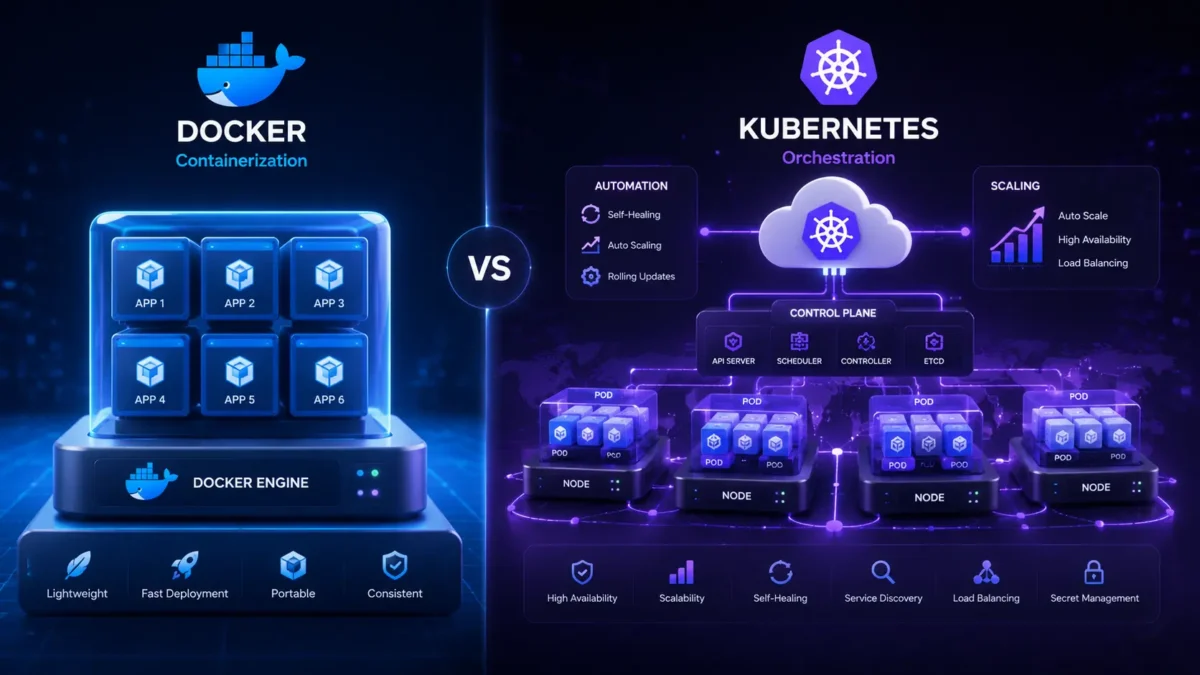
Kubernetes works by grouping containers into logical units called Pods. These pods run on nodes (physical or virtual machines), which are grouped into a cluster. A control plane oversees the cluster, making scheduling decisions and ensuring the desired state of the application is always maintained.
- Pods — smallest deployable unit, wrapping one or more containers
- Nodes — machines that run pods
- Control Plane — the brain that schedules and manages workloads
- Services — expose pods to the network stably
Kubernetes vs Docker: Key Differences
While Docker and Kubernetes are often mentioned together, they operate at fundamentally different layers of the stack. Here is how they compare:
- Packages apps into containers
- Runs on a single host by default
- Simple to learn and use
- Best for development environments
- Lightweight, fast startup
- Manages containers at scale
- Runs across multiple hosts/clusters
- Steeper learning curve
- Built for production workloads
- Self-healing, auto-scaling
Purpose
Docker’s purpose is to create and run individual containers. It provides the container runtime — the engine that actually starts and stops containers on a machine. Kubernetes’ purpose is to orchestrate those containers across a distributed system, deciding where and when they run, and maintaining their health automatically.
Architecture
Docker operates on a single-node model by default — a developer’s laptop or a single server. It has a daemon that manages local containers. Kubernetes has a more complex architecture with a control plane (master node) and multiple worker nodes, making it inherently distributed.
Scalability
Docker Compose can manage multiple containers, but scaling to hundreds of instances across machines is not its strength. Kubernetes was built for exactly that — it can automatically scale workloads up or down based on CPU usage, memory pressure, or custom metrics.
Complexity
Docker has a gentle learning curve. You can be productive within hours. Kubernetes requires understanding of clusters, namespaces, RBAC, networking policies, and more. It is powerful, but it comes with significant operational overhead.
Use Cases
Docker excels in local development, testing, and packaging applications for deployment. Kubernetes excels in production environments where high availability, automatic recovery, and dynamic scaling are required.
| Category | Docker | Kubernetes |
|---|---|---|
| Primary Role | Container creation & runtime | Container orchestration & management |
| Scope | Single host | Multi-node clusters |
| Scaling | Manual or via Compose | Automatic, policy-driven |
| Self-healing | Limited (restart policies) | Yes — restarts, reschedules, replaces |
| Load Balancing | Basic | Built-in, advanced |
| Networking | Bridge/host networks | Cluster-wide networking with Services |
| Storage | Volumes (local) | Persistent volumes across nodes |
| Learning Curve | Low | High |
| Best For | Development & testing | Production & enterprise workloads |
How Kubernetes and Docker Work Together
It is a common misconception that Kubernetes and Docker compete with each other. In practice, they are complementary. The typical workflow looks like this:
- A developer writes a Dockerfile and builds a container image with Docker
- The image is pushed to a container registry (such as Docker Hub or AWS ECR)
- Kubernetes pulls that image and deploys it across nodes in a cluster
- Kubernetes manages the lifecycle — scaling, healing, rolling updates — automatically
Docker provides the container. Kubernetes provides the infrastructure to run thousands of those containers reliably. Together, they form the backbone of modern containerized applications in production.
Benefits of Docker
- Lightweight — containers share the host OS kernel, using far fewer resources than virtual machines
- Portability — a Docker image built on a developer’s laptop runs identically in staging and production
- Faster deployment — containers start in seconds, enabling rapid iteration and CI/CD pipelines
- Isolation — each container is isolated from others, reducing dependency conflicts
- Developer productivity — standardised environments eliminate “it works on my machine” problems
- Rich ecosystem — Docker Hub offers thousands of pre-built images for common services
Benefits of Kubernetes
- Automation — automates deployment, scaling, and operational tasks that would otherwise require manual intervention
- Auto-scaling — automatically adjusts the number of running containers based on demand
- High availability — distributes workloads across nodes and automatically recovers from failures
- Rolling updates — deploys new versions with zero downtime, with instant rollback capability
- Resource efficiency — intelligently schedules containers to optimise resource utilisation
- Multi-cloud support — runs consistently across cloud hosting solutions from any provider
When to Use Docker vs Kubernetes
Small-to-medium applications
- You’re building or testing locally
- Your team is small and scaling is not yet a concern
- Running a handful of containers on one server
- You need quick environment setup for developers
- You are a startup in early-stage product development
Large-scale production systems
- Running many microservices in production
- You need automatic scaling and self-healing
- High availability is a business requirement
- Deploying across multiple regions or clouds
- You are an enterprise with complex workloads
As a general rule: start with Docker and add Kubernetes when your system grows to the point where manual container management becomes a bottleneck. Many teams use Docker for local development and Kubernetes for production — getting the best of both.
Kubernetes and Docker in Cloud Platforms
Every major cloud provider now offers managed Kubernetes and container services, making it straightforward to deploy at scale without managing the underlying infrastructure yourself.
Amazon EKS (Elastic Kubernetes Service) and ECS provide fully managed container orchestration. AWS Fargate removes the need to manage servers entirely. Ideal for teams already invested in the AWS ecosystem.
Azure Kubernetes Service (AKS) offers enterprise-grade Kubernetes with deep Active Directory integration. Perfect for organisations requiring scalable cloud infrastructure with strong compliance controls.
Google Kubernetes Engine (GKE) is the most mature managed K8s offering — Google invented Kubernetes. Autopilot mode removes all node management for a fully serverless container experience.
Choosing the right platform depends on your team’s existing infrastructure, compliance requirements, and cost model. Maximyz Cloud offers expert guidance across all three, with cloud infrastructure services tailored to your business needs.
Conclusion
Kubernetes and Docker serve different but complementary roles in the container ecosystem. Docker simplifies the process of building and running containers — making it the go-to tool for development teams and smaller deployments. Kubernetes brings the management layer needed to run containers reliably at scale in production environments.
The right choice depends on your stage of growth. If you are building something new, start with Docker. If you are scaling a production system with reliability requirements, Kubernetes is the natural next step — and the two work best when used together.
Not sure which path is right for your organisation? The team at Maximyz Cloud can help you design and implement the right container strategy — from architecture to deployment.
Ready to modernise your infrastructure with containers? Talk to a Maximyz Cloud specialist today.
Get Expert Guidance →